Masks
A top-level mask block restricts where a post-processing effect applies. The coverage is
computed once per frame in a prepass at screen layer 0 (the only layer where scene depth is
intact), so the effect itself may run at any screen layer and simply reads the result. A mask is a
composition ("op": "union" | "intersection" | "difference") of leaves; every leaf is one of:
- a screen shape —
circle,ellipse,rect,polygon— classified in UV, no depth needed; - a world volume —
sphereorbox— classified against the depth-reconstructed world position; - a sky leaf (the whole sky) or a 2D shape in
space: "dome"(addressed on the sky dome); - a block leaf (the selected blocks' model geometry) or a custom shape (a registered composed SDF or GLSL plugin).
Post effects only. A
maskgates a fullscreen post-processing pass: its coverage is a screen-space texture built from scene depth, and the post chain blends it into the frame. The world overlays —pulse_ring,light_beam,guide_line,particles,block_chain,block_tint,block_outlineand the entity effects — draw world-space geometry and have no post pass, so amaskon one of them is parsed and then does nothing: it neither restricts that geometry nor reports an error (forpulse_ring,light_beam,guide_line,particlesandblock_chainthe coverage is even computed and then never read). To confine a world overlay, drive its own spatial params —radius,thickness,intensity,regionorpos_x/y/z— for example from anexpror a field.
Composition nests on the left only: the right operand of an op must be a leaf, so write
intersection(union(A, B), C) (which flattens to min(max(A, B), C)), not
union(A, intersection(B, C)) — the latter would flatten to min(max(A, B), C) and is a parse
error naming the offending op. A mask carries at most two custom leaves and at most one
block leaf (all block leaves share one geometry scratch), both enforced at parse.
invert flips the composed coverage; softness is the edge falloff width (screen units or world
blocks); fill: solid|stroke with stroke_width draws a boundary band. softness scales the
composed-result falloff and a GLSL plugin's edge. A block leaf's coverage is rasterised full or
absent per fragment, so its edge is hard by design and softness does not apply. Every numeric leaf
(radius, half_width, center, softness, …) takes a number, { "from": "<node>" } or a world
binding ({ "bind": "entity", ... }), so a shape can follow an entity.
A scalar binding derives a number from its source. "derive": "distance" (the default) is the
camera distance to the source in blocks, so
"radius": { "bind": "entity", "selector": "@e[type=minecraft:villager,limit=1]", "derive": "distance" }
makes the sphere grow as the viewer backs away from the villager (see vfxweaver:mask_pulse_demo);
"derive": "point" yields the world position (valid on center only) and "derive": "screen_rect"
projects the entity's bounding box into a UV rectangle (valid as screen_rect on a screen rect).
A binding that cannot be resolved — the source entity is absent or off-screen (or outside the
client's tracking range), or there is no camera/player state — fails that leaf closed: the leaf
contributes zero coverage and never falls back to its literal default, which for an unbound rect
would be the whole screen. Only that leaf is dropped, so an entity leaving the view no longer takes a
still-resolved world leaf down with it. An unresolved leaf can never expand coverage (a zero leaf is
neutral for union/difference and contracts intersection), and an invert mask does not flip an
all-unresolved (empty) result into full-screen coverage. The unresolved source still reports once
through VFXLog.warnOnce.
A binding resolves its selector against the loaded client entities through a subset of the
vanilla selector grammar: the bases @s, @p, @a, @r, @e and a bare entity name, and the
arguments type=, tag=, name= (each optionally negated with !, values optionally quoted),
distance= (N, N..M, ..M, N..), limit=N and sort=nearest|furthest|random|arbitrary.
That covers the natural forms — @e[tag=vfx_showcase,limit=1] and
@e[type=minecraft:villager,limit=1] both work. Server-only grammar (nbt=, scores=,
advancements=, team=, gamemode=, level=, x/y/z/dx/dy/dz, x_rotation/
y_rotation, predicate) is not supported client-side: such a selector fails the binding closed
like any other unresolved source and logs the offending selector once, instead of silently
matching the nearest entity.
Two caveats. An entity outside the client's tracking range is genuinely unresolvable on the client
— that is a client-search limitation, not a bug, and the bound leaf contributes nothing there. To
drive a mask from data the client does not have, set its centre from the server every tick with
VFXAPI.sendMaskMove(player, effect, leaf, pos) (or sendSetParam on the reserved
mask.p<N>.center_* params) instead of binding the leaf to the entity.
Layer note. The coverage prepass reads the intact scene depth once at screen layer 0, and the coverage it produces is screen-space (derived from world depth). An effect that consumes the mask at a later layer — e.g.
"screen_layer": 1— runs after the first-person hand and other late-drawn geometry, so the hand is tinted wherever a masked block lies behind it, even though the hand is nearer. To avoid this, run the masked effect atscreen_layer: 0, or depth-occlude the consumer against a layer-0 depth snapshot.Depth note. The scene depth is read on every supported node. Each node's convention is proven from the client jars and injected into the shader as a per-node flag: 26.2 is reversed (near = 1), 26.1.2 and 1.21.11 are standard (near = 0). A mask that needs depth (a
worldleaf, adome/skyleaf, anauravolume, or a block leaf) still fails closed — it contributes zero coverage and its depth-tested block pass is disabled — when no trustworthy depth is available (no depth attachment, or the camera snapshot is not ready on the first frame), never a wrong sample. A purelyscreenmask needs no depth and works on every node and every layer.Concurrency note. Two simultaneous plays of one masked definition share a single coverage target, so both use the first play's animated centre/radius/softness. To have two masks with independent regions on screen at once, put them in two distinct definitions.
The mask's numeric leaves are ordinary animatable effect parameters under reserved names:
mask.p<N>.center_x|center_y|center_z, .rotation, .p<J> (the per-shape parameter J), .soft
(falloff), .stroke (stroke width), .field_amount/.field_scale, and the dynamic float data
.d<J> (see below); <N> is the leaf index in declaration order (0-based). Because they are
ordinary params, keyframes, expr, graph { "from": node } driven inputs, datapack bindings and
every live-edit API (sendSetParam, sendKeyframe, setParam, …) work on them unchanged. The
mask. prefix is reserved (see the Java API).
Dynamic float data (data): live plugin geometry without a recompile
A custom leaf (composed or GLSL plugin) carries up to 32 reserved dynamic floats
mask.p<N>.d0 … d31, authored as a "data": [ … ] array on the leaf (each entry a number,
{ "from": "<node>" } or a world binding; absent entries default to 0). They are registered exactly
like the p<J> params, so every live path reaches them — and a GLSL plugin reads them live:
{
    "mask": {
        "a": {
            "shape": "mymod:blobs",
            "space": "screen",
            "center": [0.5, 0.5],
            "data": [0.25, 0.25, 0.1, 0.75, 0.6, 0.08],
            "softness": 0.02
        }
    }
}
A GLSL-plugin leaf reads its own slice through the wrapper helpers (declared for it — the plugin must not declare them):
float vfx_shape_custom(vec3 world, vec2 uv, vec4 p0, vec4 p1) {
    // Three circles at (cx, cy, r), driven by mask.p0.d0..d8, updated every tick.
    float acc = 1.0e6;
    for (int c = 0; c < 3; c++) {
        vec2 centre = vec2(vfx_mask_data(vfx_shape_data_base + c * 3),
                          vfx_mask_data(vfx_shape_data_base + c * 3 + 1));
        float radius = vfx_mask_data(vfx_shape_data_base + c * 3 + 2);
        acc = min(acc, length(uv - centre) - radius);
    }
    return acc;
}
vfx_shape_data_base is set by the coverage shader to the calling leaf's slice start (leaf i
owns i * 32), so one plugin source serves every leaf. Update the values from code every tick with
VFXAPI.maskData(effect, leaf, values) / VFXAPI.sendMaskData(player, effect, leaf, values), or one
at a time with setParam/sendSetParam on mask.p<N>.d<J>. A data update is an ordinary param
edit: the coverage shader variant is keyed only by the set of plugin ids, so changing data never
recompiles it. An existing plugin that ignores the helper compiles and behaves exactly as before.
The dynamic data is per leaf (index in declaration order), matching
p<J>. A leaf's data is delivered to the plugin call for that leaf; the plugin function itself is shared.
Two limitations are deliberate. A mask's custom leaves may reference one distinct GLSL plugin id:
the compiled coverage variant injects a single vfx_shape_custom, so two leaves that name two
different plugin ids fail to compile and the whole mask falls back to neutral coverage (two leaves
sharing one plugin id, or a composed leaf beside a plugin leaf, are fine). And on the 1.21.11 node
there is no shader-source hook, so a GLSL-plugin shape renders nothing there — the composed-SDF kind
works on every node. A "data" array registers a constant mask.p<N>.d<J> param per slot, so a
large mask sends a larger play packet; a 2.0.1 client caps the parameter map at 32 and cannot decode
it, so pair a many-slot mask with 2.0.2 clients (the wire format itself is unchanged).
World-volume evaluation: volume
A sphere/box leaf carries an optional "volume" field choosing how the volume is evaluated
against the scene. Both modes are first-class looks; the default is "surface".
volume |
What it looks like | When to use |
|---|---|---|
"surface" (default) |
The visible surface is classified: a pixel is covered where the depth-reconstructed point lies inside the volume, so only geometry inside the region is tinted and the air/sky around it is not. This is the original look. | "Affect the things standing in this region" — the tint follows the objects, not the space. |
"aura" |
The pixel's view ray is cast at the volume and the whole volume is filled — including air and sky — except where a nearer surface occludes it. | A glow/haze field that occupies the whole region, so it reads as a volume of light rather than a coat of paint on the objects. |
Both modes fade their edge over the leaf's softness. In aura mode the coverage is sampled at the
volume depth nearest the viewer along the pixel's view ray, so the interior fills to full coverage
and the silhouette edge fades from both sides; coverage is 0 where a nearer surface occludes the
volume and 0 where the ray misses it. Sky and missing depth count as "nothing occludes", so the
aura still fills the volume's silhouette instead of vanishing against the sky.
{
    "type": "color_grade",
    "duration": 800,
    "loop": true,
    "persistent": true,
    "params": { "screen_layer": 1, "tint_r": 1.0, "tint_g": 0.2, "tint_b": 0.2 },
    "mask": {
        "a": {
            "shape": "sphere",
            "space": "world",
            "volume": "aura",
            "center": { "bind": "entity", "selector": "@e[type=minecraft:villager,limit=1]", "point": "center" },
            "radius": 6.0,
            "softness": 0.5
        }
    }
}
volume on a custom GLSL-plugin leaf
A world GLSL-plugin leaf accepts the same "volume": "aura" field. An arbitrary distance field has
no analytic ray, so the pixel's view ray is sphere-traced through the plugin's own SDF: entry and
exit are found by marching, and the signed closest approach of the ray is estimated by a Lipschitz
cone-envelope — the crossing of the gradient cones of consecutive samples lower-bounds the field
between them, and the minimum crossing lower-bounds how deep (or how near-missed) the ray is. That
bound feeds the same built-in aura maths as a sphere/box leaf — silhouette, edge fade and scene
occlusion — so a wall-shaped aura is hidden by a hill in front of it and fills air and sky. Entry is
bracketed by false-position (the exact root inside the last sample pair), so the entry distance —
which also feeds the occlusion ramp — is continuous rather than quantised to the sample grid.
The envelope is what makes a plugin aura edge smooth. The previous deep point was the sampled
minimum of the march, so the edge resolved into steps of the sample spacing, and a ray that entered
scored ≥ 0.5 while a miss scored a hard 0 — a visible ~0.5 cliff. The envelope bound is continuous
in screen space, is exact for creased fields (max/min compositions of distance bounds — the usual
way to build a wedge or a shell), and is never thinner than the truth.
The ray is graded by its deepest penetration, not its first exit. Entry and exit used to be two
marches, and the second one stopped at the first d > 0 — so on a volume with a bump the solid mass
behind the bump was never sampled, the silhouette reported the bump's shallow depth, and the coverage
dipped across it (reported as an arch/dip at the bottom of a wall). There is now one pooled loop over
the same 40 + 16 steps that never stops at a sign crossing: the cone bound stays global over the whole
ray (the global minimum is the deepest segment's minimum, so a bump in front of a mass no longer hides
it), the first entry still feeds the occlusion ramp, and the last exit brackets the horizon fade.
Saturation stays a sample certificate (d <= -0.5 * softness), and running out of steps deliberately
does not saturate — a long shallow corridor would otherwise light up as a false bright patch. The
step carries an additive boost, (|d| + 0.2 * softness) / L, because a plain |d| step collapses onto
the 0.5 floor wherever the field is small, so a grazing approach or the gap behind a bump cost ~2 steps
per unit and could eat the whole budget before the solid part was reached; the boost is bounded
(L * h <= |d| + B), which is why a ray that never enters can now reach at most 0.5 + 0.1 of coverage
rather than 0.5. Two consequences worth knowing: an occluder sitting between two parts of one volume
does not dim it (union semantics — the nearer part is the same volume), and the boost makes a grazing
edge very slightly fatter. Cost moved the other way: the fixture's flat wings drop from 22.0 to 8.9
SDF calls per ray and a receding ray terminates on the dive bound in 5 instead of burning all 40.
{
    "type": "color_grade",
    "duration": 800,
    "loop": true,
    "persistent": true,
    "params": { "screen_layer": 1, "tint_r": 1.0, "tint_g": 1.0, "tint_b": 1.0 },
    "mask": {
        "a": {
            "shape": "mymod:zone_sdf",
            "space": "world",
            "volume": "aura",
            "center": [0, 64, 0],
            "softness": 0.5
        }
    }
}
A composed custom leaf has no raw SDF to march, so "volume": "aura" on one is a per-file parse
error naming the shape — it does not silently fall back. A screen-space plugin leaf is rejected for
the same reason: a uv-space distance cannot be marched in world units.
"occlusion": false — a fill that ignores scene depth
An aura leaf is hidden by whatever surface the depth buffer holds. That is right for terrain, and
wrong for a translucent surface: stained glass, ice or a water surface write depth, so an aura
behind a glass wall is (correctly, by the textbook) considered occluded and the fill disappears
behind it. On an aura leaf, "occlusion": false turns the occlusion term off, so the volume is
filled regardless of the depth buffer:
"a": { "shape": "sphere", "space": "world", "volume": "aura", "center": [0, 64, 0],
       "radius": 40, "softness": 4, "occlusion": false }
It is accepted only on an aura leaf (a parse error elsewhere, same as volume), defaults to
true (existing packs are byte-for-byte unchanged), and costs no extra SDF call. The price is that
it is all-or-nothing: with the scene depth ignored, the volume is also drawn over nearer terrain and
over anything else in front of it. That is the honest ceiling — see the limits below.
"occlusion_softness" — the occlusion width, decoupled from the edge softness
The occlusion ramp is measured in world blocks, and by default it used to be the same number as the
leaf's softness — so a deliberately soft silhouette also decided how softly the fill was hidden by
the surface, with no way to choose otherwise. occlusion_softness is that second knob, on an aura
leaf:
"a": { "shape": "sphere", "space": "world", "volume": "aura", "center": [0, 64, 0],
       "radius": 40, "softness": 6, "occlusion_softness": 0.5 }
Coverage is 0.5 exactly where the volume's entry sits on the visible surface, and falls to 0 or 1
over this width instead. Absent, the ramp keeps following softness, animation included, so no
existing mask changes. Set it small (≈ the depth tolerance, i.e. sub-block) for a crisp silhouette
that follows the terrain, and leave it out for a soft fade. Because a blocky hillside is a 1-block
staircase, a ramp as wide as softness turns every one of those steps into a band along the
silhouette (measured: ~45 visible levels of ~0.022 coverage each at softness 44.8), and it also
dims a volume that is one block in front of the surface and half-shows one that is one block
behind it — a narrow width reaches 1.0 and 0.0 at those points instead.
The ramp also has a screen-space floor, and it is what stops the comb. Whatever width you author,
the ramp is widened when the reconstructed depth changes fast from one pixel to the next — a grazing
view of the ground is the usual case, where the distance to the surface swings by several blocks per
pixel, so a world-space ramp collapses into a sub-pixel staircase whose steps follow the terrain's own
block edges and the silhouette aliases into a comb. The ramp is kept at least 48 pixels wide on screen
wherever that happens, capped at 4× the authored width so a depth discontinuity (a cliff edge, which
spikes the per-pixel slope for the pixel or two that straddle it) cannot smear the edge. Your
occlusion_softness remains the floor, so a near, face-on occluder stays exactly as crisp as you set
it. Measured at 2.8 blocks per pixel: the ramp runs 44.8 → 134.4 blocks and the coverage step per
terrain block edge falls from 0.0223 to 0.0074, below what an 8-bit target can show. Right at the
horizon — hundreds of blocks per pixel — no world-space ramp can stay smooth and the edge stays hard;
that is by design, since widening further would erase the occlusion altogether.
"aura_steps" — a cap on one leaf's march budget
The march on a custom aura leaf runs on a budget of 40 + 16 = 56 iterations. "aura_steps" is an
optional number on the leaf that puts a lower ceiling on it, and changes nothing else:
"a": { "shape": "mymod:zone_sdf", "space": "world", "volume": "aura",
       "center": [0, 64, 0], "softness": 0.5, "aura_steps": 24 }
It is accepted only on a custom leaf with "volume": "aura", and anywhere else it is a per-file
parse error naming the shape. That gate is deliberately narrower than occlusion /
occlusion_softness above, which any aura leaf may take: only a plugin leaf has a march to bound, since
a built-in sphere/box aura leaf samples one chord midpoint and a surface leaf classifies a point.
A negative value is a parse error; a value above the loop's own 56 is clamped to it, because a
cap the loop cannot reach is unreachable budget rather than an author error. Absent — or 0 — is no
cap at all, and the leaf is then identical to today, ray for ray. The field bounds the march loop
only; the 4 refine steps that follow it are untouched.
The budget is a cap, not a cost. The march already leaves early on a saturated sample, on the dive
bound and on the range limit, so the 56 is an upper bound it rarely approaches: measured across the
ray classes scripts/check-aura-bounds.ps1 simulates, a ray spends 1 (already inside the volume) to
20, and only a ray skimming a thin shell spends the lot. Expect a handful of evaluations on a typical
ray, and treat a cap as a last resort for a leaf that really does burn the budget — not as a way to
make an ordinary aura many times cheaper. Capping a leaf whose rays already finished in 16 buys nothing
measurable and costs silhouette. If a mask is what a frame is paying for, the lever is the plugin's
declared broad phase (vfx_shape_custom_bounds(), see the Java API and the cost notes
below), not this field.
What a cap costs is a softer rim, and it is best-effort — never a saturation. A truncated march
keeps whatever the cone envelope and the entry distance had reached, and it does not light up as a
false bright patch the way an unbounded march would. One consequence is worth knowing before tuning it:
a march that runs out of budget while still inside the volume falls into the shipped
tExit = tLimit rule — a short fake chord would fade a live volume — so the chord is reported as open
to the range limit, and on a soft leaf whose chord ends within softness of the camera a low cap can
therefore read slightly higher than uncapped (measured: +0.23 at a cap of 2, bounded by the
uncapped march's own silhouette factor). That is the declared behaviour of that rule, not a saturation
and not a clamp, and no coverage is invented beyond what the penetration depth allows.
The depth leaf — coverage from the scene distance
"shape": "depth" is a leaf whose coverage is a function of the pixel's reconstructed scene distance
(the same value the aura occlusion uses). It has no geometry of its own, so the leaf's softness is
the falloff width — there is no separate tolerance knob:
| Scene distance | Coverage |
|---|---|
<= distance - softness/2 |
1 |
= distance |
0.5 |
>= distance + softness/2 |
0 |
{ "type": "blur", "params": { "amount": 6, "radius": 8 },
  "mask": { "a": { "shape": "depth", "distance": 32, "softness": 16 } } }
That reads as a depth-of-field gate: everything nearer than ~24 blocks is full coverage (sharp), the
focus band at distance is half covered, and everything past ~40 blocks (including the sky) is not
covered at all. invert flips it, so a difference of two depth leaves is a band around one
distance, and a sky leaf composited away from it excludes the sky explicitly. Sky and any pixel with
no trustworthy depth keep the far sentinel, which lands on the uncovered side — the leaf fails closed
there. No field and no stroke on this leaf.
The point of the leaf is camera-relative coverage without a driver: the same thing
{"shape": "sphere", "center": [player]}, but no per-frame centre push from Java, and no
entity to resolve.
Honest limits of a depth-based mask. Everything a depth mask knows about the scene it read from the depth buffer, and nothing else: - Particles, rain and snow are not in it. Vanilla renders weather with depth writes off and particles per their own render type, so a fill built from depth is drawn over them. This is not fixable in one pass with one depth sample; only a second pass or a depth copy would see them. - Translucent geometry is in it. A surface you can see through still hides an aura (and a surface leaf simply answers "is that point in the shape", which is correct).
occlusion: falseis the escape hatch, at the price of also drawing over nearer terrain. - Under an Iris shaderpack the behaviour follows whatever depth the pack leaves in its target.The occlusion ramp is also denominated in a width of its own (see
occlusion_softness), and the default for that width is the leaf'ssoftness— so on a wide, soft volume the transition from "in front of the surface" to "behind it" spanssoftnessblocks, and a blocky hillside turned into a 1-block staircase therefore reads as a stack of bands along its silhouette (measured at 44.8 blocks of softness as ~45 visible levels of ~0.022 coverage each). Authorocclusion_softnessto narrow that ramp: the terracing cannot be removed (the occluder really is quantised in blocks), but a sub-block width collapses it into a single silhouette edge instead of ~45 of them.
The field must be a conservative distance (the one hard obligation). The march steps by the value
the plugin returns and the cone-envelope is built from the same bound, so vfx_shape_custom must
never over-estimate the distance to the boundary — i.e. |grad d| <= 1 everywhere, negative inside.
max/min compositions of correct fields stay conservative, so C1 smoothness is not required and
a hard max crease is fine (the envelope is exact there). What breaks the bound is perturbing a
distance field — a noise term, a smooth-min with a bias, a scaled composition — because it can report
more than the true distance and the march then over-steps. Either scale the whole returned value down
until it is conservative, or declare the real bound when you register the shape:
// |grad d| <= 1.25 for this field; clamped to >= 1.0, and a variant of several plugins uses the max.
VFXAPI.registerMaskShapeGlsl(id, () -> SOURCE, 1.25F);
Under-declaring keeps the previous over-stepping, so the bound must be a true upper bound on the
gradient. Declaring L also widens the envelope slightly (the edge thickens by ~(L-1)), which is the
price of a correct march.
Cost. The march evaluates the plugin up to 40 entry + 16 exit + 4 refine steps, against the single
analytic evaluation a built-in sphere/box costs. Two things cut it:
- The optional broad phase. A plugin may declare
vec4 vfx_shape_custom_bounds()returning a world(centre.xyz, radius), a negative radius meaning "no bound". The ray is tested against that sphere first: a miss rejects the pixel with no SDF call at all, and a hit starts the march at the sphere's near point, so the average cost follows the volume's screen area instead of the whole frame. A plugin that omits the function is unchanged (the wrapper falls back to the unbounded march), and a bound that is too small clips the aura — it has to enclose the geometry. The bound may read the same data and the calling leaf's params: the coverage shader publishes the leaf'sp0/p1(the same values passed tovfx_shape_custom) as the wrapper globalsvfx_shape_params0/vfx_shape_params1, so a bound that scales or offsets from the params stays conservative. A plugin must not declare any ofvfx_mask_data,vfx_shape_data_base,vfx_shape_params0orvfx_shape_params1. - An early exit once the cone-envelope bound already reaches full coverage, and one more before it:
if a straight dive from the current sample cannot get within
softnessof the surface, the rest of the ray cannot change the answer.
Because the envelope is a conservative bound, a wide soft volume fades a little wider than the ideal
half-softness and its interior saturates slightly earlier — smooth and monotone, never stepped, and
never thinner than the true volume.
Built-in reference: vfxweaver:blobs_glsl. The mod ships one world plugin to use as the
template (the screen-space reference stays vfxweaver:ringed_glsl). It is the union of up to eight
world-space spheres, and it exercises the whole contract — the SDF and its broad phase read the same
slots:
| Slot | Meaning |
|---|---|
d[4k+0..2] |
sphere k's centre (x, y, z) in world coordinates (k = 0..7) |
d[4k+3] |
sphere k's radius; <= 0 skips the sphere |
p0.xyz |
global centre offset added to every sphere |
p0.w |
global radius scale (0 behaves as 1) |
p1.x |
global radius bias, added after the scale |
p1.y |
sphere-count override (0 = every data sphere with radius > 0) |
p1.zw |
reserved |
The SDF is negative inside the union (a conservative world SDF), so it works for both surface and
volume: "aura"; vfx_shape_custom_bounds() returns the enclosing sphere of the same offset/scaled
spheres, so an aura march with it is cheap. Animate mask.p0.d<J> to move the spheres live (the
dynamic-data demo does exactly that).
{
    "type": "color_grade",
    "duration": 200, "loop": true, "persistent": true, "easing": "ease_in_out_cubic",
    "params": { "screen_layer": 1, "tint_r": 1.0, "tint_g": 0.75, "tint_b": 0.25, "saturation": 0.4 },
    "mask": {
        "a": {
            "shape": "vfxweaver:blobs_glsl",
            "space": "world",
            "volume": "aura",
            "center": [0.0, 0.0, 0.0],
            "params": [0.0, 0.0, 0.0, 1.0, 0.0, 0.0],
            "softness": 0.4,
            "data": [2000.0, 101.0, 2000.0, 2.0, 2001.4, 101.6, 1999.6, 1.4]
        }
    }
}
surface mode never tints the sky. A custom leaf in the default surface mode classifies only
what the depth buffer contains, so a sky pixel contributes no coverage. Built-in shapes already did
that implicitly (their bounded SDF puts a far-plane point outside the shape); for a custom leaf the
gate is explicit, because its SDF may be intentionally unbounded. A plugin that used to paint the sky
from a surface leaf no longer does — that is the point of the gate.
Sky masks: the sky leaf and space: "dome"
Two leaves address the sky rather than the world. Both need scene depth, because the only thing that tells the sky apart from geometry is the depth test.
sky— the whole sky. Its coverage is exactly "this pixel is sky", so it covers every visible part of the sky and nothing else; it takes no parameters and nocenter.
{
  "type": "color_grade",
  "duration": 400,
  "params": { "screen_layer": 1, "tint_g": 0.2, "tint_r": 0.1, "tint_b": 0.1 },
  "mask": { "a": { "shape": "sky" } }
}
{"shape": "sky"} is enough: a sky leaf defaults to dome space and ignores a centre.
- space: "dome" on a 2D shape — circle, ellipse, rect or polygon addressed on the sky
dome. The dome is an equirectangular map of the sky (the familiar "world map" projection): the
fragment's view direction is converted to a position on that map, and the shape is drawn there.
center is [yaw, pitch] in degrees (yaw 0 = south, 90 = west, 180/-180 = north;
pitch -90 = straight up, 0 = horizon, 90 = straight down); radius/half_width are in dome
units, where 0.5 spans half the dome; rotation rotates the shape in the dome plane.
A dome leaf is sky-occluded by construction: a pixel that is not sky contributes zero, so a hill or
a wall occupying a dome direction is never tinted. That is the deliberate difference from a world
leaf (which classifies geometry) and a screen leaf (which can cover anything). A shape authored near
a pole is stretched horizontally by the projection — expected for an equirectangular map.
A dome leaf's center must be a literal [yaw, pitch]; a bound center (an entity or world
position) is not supported yet and is a parse error. A sky leaf may not be screen or world
(mask: shape 'sky' is dome-only), and dome space accepts only the 2D shapes and sky — a custom
(plugin or composed) shape has no dome meaning
(mask: 'space': 'dome' is only valid on the 2D shapes or the 'sky' leaf).
Fail-closed. A
sky/domeleaf reads the same depth as every other depth-needing mask and contributes zero coverage whenever there is no trustworthy depth, so a pack that leaves no usable far depth simply never matches and the leaf can never flood the screen. The far-depth test is verified in game on all three lines (26.2, 26.1.2 and 1.21.11).What "sky" includes — the sun, the moon and the clouds. They are drawn in the sky pass without writing depth, so a
skyordomeleaf covers them exactly like the empty sky: a recoloured sky recolours the sun and the moon with it, and the clouds too wherever a depth-writing surface is not in front of them. That is the point of a whole-sky effect. To sit under the celestial bodies instead (the vanilla sun and moon drawn on top of the effect), thesky_layerselector is planned but not built yet.Fog is not part of the sky. The horizon fog band is baked into the terrain pixels during world rendering, so a sky mask does not recolour it: a strong sky recolour can leave a visible seam where the fog meets the sky. Blend the mask into a screen-space gradient near the horizon, or keep the tint soft, if that seam matters.
Block masks: occlude
A block leaf carries an optional "occlude" boolean controlling whether its rasterised model
geometry is occluded by the scene. Both looks are first-class; the default is true.
occlude |
What it looks like | When to use |
|---|---|---|
true (default) |
A fragment of a selected block is drawn only where it is nearer than the scene surface at that pixel; a wall in front hides the mask. | The mask reads as a tint on the blocks themselves — what the player can actually see. |
false |
Today's see-through ("x-ray") look: the selected blocks are marked regardless of what is in front of them. | Highlighting blocks through walls, e.g. locating a vein behind terrain. |
occlude is only valid on a block leaf; setting it on any other family is a parse error. It is
evaluated per fragment in the geometry pass at screen layer 0, against the main target's depth
buffer (per-node convention: 26.2 reversed near = 1, 26.1.2/1.21.11 standard near = 0); it never runs
a per-pixel block lookup.
{
    "type": "color_grade",
    "duration": 600,
    "loop": true,
    "persistent": true,
    "params": { "screen_layer": 1, "saturation": 0.2, "tint_r": 0.6, "tint_g": 0.8, "tint_b": 1.0 },
    "mask": {
        "a": {
            "shape": "block",
            "blocks": ["minecraft:stone", "minecraft:cobblestone"],
            "center": [0.0, 64.0, 0.0],
            "radius": 16.0,
            "softness": 1.0,
            "occlude": true
        }
    }
}
Reference examples. vfxweaver:mask_block_demo tints the stone-family blocks around
[0, 64, 0] with "occlude": true (a wall in front hides the tint); vfxweaver:mask_block_xray_demo
is the same selection with "occlude": false — play one, then the other, to compare the occluded
and see-through looks. vfxweaver:mask_entity_demo is an entity-following sphere with a fixed
radius of 4 blocks in aura mode plus a screen rectangle; vfxweaver:mask_world_demo is the same
fixed-radius sphere in the default surface mode — play one, then the other, to compare the two
looks. vfxweaver:mask_pulse_demo keeps the entity-following sphere but binds its radius with
"derive": "distance", so the sphere grows with the viewer's distance from the villager (a
proximity pulse). vfxweaver:mask_screen_demo is a screen-only mask and works at any layer.
vfxweaver:mask_custom_demo is a registered composed SDF (a ringed volume). The built-in GLSL
plugins are the two references: vfxweaver:ringed_glsl (a screen ring with 8 petal-modulated
lobes, used by vfxweaver:mask_custom_glsl_demo) and vfxweaver:blobs_glsl (a world union of
spheres, used by vfxweaver:mask_custom_glsl_aura_demo, vfxweaver:mask_custom_glsl_surface_demo
and vfxweaver:mask_custom_data_demo). The plugin leaf shape is a 26.x feature; on the 1.21.11
node there is no shader-source hook, so a plugin leaf renders nothing there.
Showcase
show_mask_screen_demo
Its datapack definition:
{
    "type": "invert",
    "duration": 200,
    "easing": "ease_in_out_cubic",
    "persistent": true,
    "loop": true,
    "fade_ticks": 16,
    "params": {
        "intensity": {
            "keyframes": [
                {
                    "time": 0,
                    "value": 0.3
                },
                {
                    "time": 100,
                    "value": 1.0
                },
                {
                    "time": 200,
                    "value": 0.3
                }
            ]
        },
        "mask.p0.p0": {
            "keyframes": [
                {
                    "time": 0,
                    "value": 0.25
                },
                {
                    "time": 100,
                    "value": 0.4
                },
                {
                    "time": 200,
                    "value": 0.25
                }
            ]
        }
    },
    "mask": {
        "invert": false,
        "op": "difference",
        "a": {
            "shape": "rect",
            "space": "screen",
            "center": [
                0.5,
                0.5
            ],
            "half_width": 0.35,
            "half_height": 0.35,
            "corner_radius": 0.08,
            "softness": 0.02
        },
        "b": {
            "shape": "circle",
            "space": "screen",
            "center": [
                0.5,
                0.5
            ],
            "radius": 0.18,
            "softness": 0.05
        }
    }
}
show_mask_custom_glsl_demo
Its datapack definition:
{
    "type": "color_grade",
    "duration": 200,
    "easing": "ease_in_out_cubic",
    "persistent": true,
    "loop": true,
    "fade_ticks": 16,
    "params": {
        "screen_layer": 1,
        "saturation": {
            "keyframes": [
                {
                    "time": 0,
                    "value": 1.0
                },
                {
                    "time": 100,
                    "value": 0.15
                },
                {
                    "time": 200,
                    "value": 1.0
                }
            ]
        },
        "contrast": 1.0,
        "brightness": 1.0,
        "tint_r": 0.3,
        "tint_g": 0.85,
        "tint_b": 1.0,
        "mask.p0.p0": {
            "keyframes": [
                {
                    "time": 0,
                    "value": 0.25
                },
                {
                    "time": 100,
                    "value": 0.45
                },
                {
                    "time": 200,
                    "value": 0.25
                }
            ]
        }
    },
    "mask": {
        "invert": false,
        "a": {
            "shape": "vfxweaver:ringed_glsl",
            "space": "screen",
            "center": [
                0.5,
                0.5
            ],
            "params": [
                0.5,
                0.5,
                0.28,
                0.02,
                8.0,
                0.25
            ],
            "softness": 0.03
        }
    }
}
show_mask_custom_glsl_aura_demo, show_mask_custom_glsl_surface_demo, show_mask_custom_data_demo
show_mask_custom_glsl_aura_demo
show_mask_custom_glsl_surface_demo
show_mask_custom_data_demo
/vfx play vfx_demos:show_mask_custom_glsl_aura_demo
/vfx play vfx_demos:show_mask_custom_glsl_surface_demo
/vfx play vfx_demos:show_mask_custom_data_demo
The three world plugin demos, all built on vfxweaver:blobs_glsl:
- aura — three amber blobs around the scene's villager with
volume: "aura", so the whole region fills (air and all) with a real 3D silhouette; the viewer stands outside it.mask.p0.p1animates the global radius bias, so the volume breathes. - surface — the same plugin with no
volume(surface mode): only the geometry inside the blobs is tinted, and the sky is never painted (the surface gate drops sky pixels for a custom leaf). The blobs sit on the wall and floor ahead. - data — the same plugin driven by animated
mask.p0.d<J>slots, so the spheres themselves move frame to frame (the honest dynamic-data clip: the data is what moves the geometry).
{
    "type": "color_grade",
    "duration": 240, "easing": "ease_in_out_cubic", "persistent": true, "loop": true, "fade_ticks": 16,
    "params": {
        "screen_layer": 1, "tint_r": 0.4, "tint_g": 0.9, "tint_b": 1.0,
        "mask.p0.d0": { "keyframes": [ { "time": 0, "value": 1997.0 }, { "time": 120, "value": 2003.0 }, { "time": 240, "value": 1997.0 } ] }
    },
    "mask": {
        "a": {
            "shape": "vfxweaver:blobs_glsl",
            "space": "world",
            "center": [0.0, 0.0, 0.0],
            "params": [0.0, 0.0, 0.0, 1.0, 0.0, 0.0],
            "softness": 0.25,
            "data": [1997.0, 101.5, 2000.0, 1.8, 2003.0, 102.0, 2000.0, 1.5]
        }
    }
}
show_mask_block_demo
Its datapack definition:
{
    "type": "color_grade",
    "duration": 200,
    "easing": "ease_in_out_cubic",
    "persistent": true,
    "loop": true,
    "fade_ticks": 16,
    "params": {
        "screen_layer": 0,
        "saturation": {
            "keyframes": [
                {
                    "time": 0,
                    "value": 1.0
                },
                {
                    "time": 100,
                    "value": 0.2
                },
                {
                    "time": 200,
                    "value": 1.0
                }
            ]
        },
        "contrast": 1.0,
        "brightness": 1.0,
        "tint_r": 0.6,
        "tint_g": 0.8,
        "tint_b": 1.0,
        "mask.p0.p0": {
            "keyframes": [
                {
                    "time": 0,
                    "value": 8.0
                },
                {
                    "time": 100,
                    "value": 14.0
                },
                {
                    "time": 200,
                    "value": 8.0
                }
            ]
        }
    },
    "mask": {
        "invert": false,
        "a": {
            "shape": "block",
            "blocks": [
                "minecraft:smooth_stone",
                "minecraft:white_concrete",
                "minecraft:red_concrete",
                "minecraft:blue_concrete"
            ],
            "center": [
                2000.0,
                101.0,
                2000.0
            ],
            "radius": 12.0,
            "softness": 1.0,
            "occlude": true
        }
    }
}
show_mask_block_xray_demo
Its datapack definition:
{
    "type": "color_grade",
    "duration": 200,
    "easing": "ease_in_out_cubic",
    "persistent": true,
    "loop": true,
    "fade_ticks": 16,
    "params": {
        "screen_layer": 0,
        "saturation": {
            "keyframes": [
                {
                    "time": 0,
                    "value": 1.0
                },
                {
                    "time": 100,
                    "value": 0.2
                },
                {
                    "time": 200,
                    "value": 1.0
                }
            ]
        },
        "contrast": 1.0,
        "brightness": 1.0,
        "tint_r": 1.0,
        "tint_g": 0.5,
        "tint_b": 0.2,
        "mask.p0.p0": {
            "keyframes": [
                {
                    "time": 0,
                    "value": 8.0
                },
                {
                    "time": 100,
                    "value": 14.0
                },
                {
                    "time": 200,
                    "value": 8.0
                }
            ]
        }
    },
    "mask": {
        "invert": false,
        "a": {
            "shape": "block",
            "blocks": [
                "minecraft:smooth_stone",
                "minecraft:white_concrete",
                "minecraft:red_concrete",
                "minecraft:blue_concrete"
            ],
            "center": [
                2000.0,
                101.0,
                2000.0
            ],
            "radius": 12.0,
            "softness": 1.0,
            "occlude": false
        }
    }
}
show_mask_custom_demo
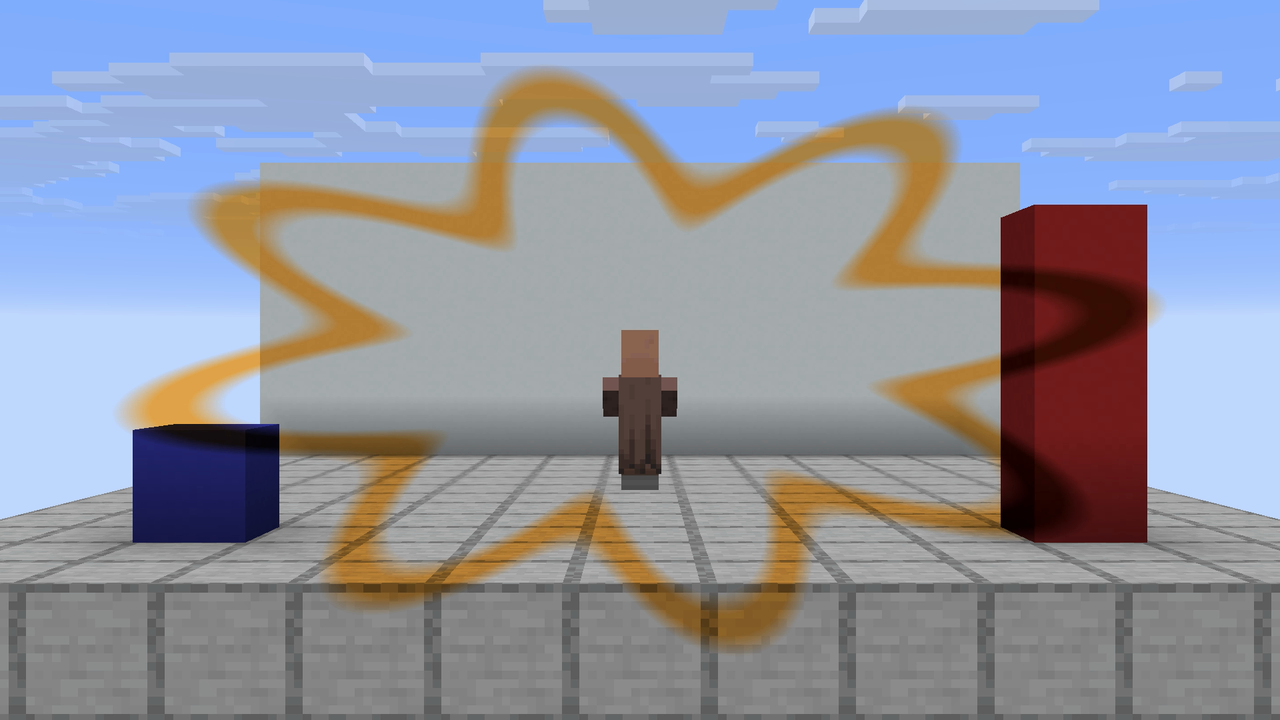
Its datapack definition:
{
    "type": "color_grade",
    "duration": 200,
    "easing": "ease_in_out_cubic",
    "persistent": true,
    "loop": true,
    "fade_ticks": 16,
    "params": {
        "screen_layer": 1,
        "saturation": {
            "keyframes": [
                {
                    "time": 0,
                    "value": 1.0
                },
                {
                    "time": 100,
                    "value": 0.3
                },
                {
                    "time": 200,
                    "value": 1.0
                }
            ]
        },
        "contrast": {
            "keyframes": [
                {
                    "time": 0,
                    "value": 1.0
                },
                {
                    "time": 100,
                    "value": 1.25
                },
                {
                    "time": 200,
                    "value": 1.0
                }
            ]
        },
        "brightness": 1.0,
        "tint_r": 1.0,
        "tint_g": 0.7,
        "tint_b": 0.3
    },
    "mask": {
        "invert": false,
        "a": {
            "shape": "vfxweaver:ringed_glsl",
            "space": "screen",
            "center": [
                0.5,
                0.5
            ],
            "params": [
                0.5,
                0.5,
                0.3,
                0.03,
                8.0,
                0.25
            ],
            "softness": 0.03
        }
    }
}
show_mask_entity_demo
Its datapack definition:
{
    "type": "color_grade",
    "duration": 200,
    "easing": "ease_in_out_cubic",
    "persistent": true,
    "loop": true,
    "fade_ticks": 16,
    "params": {
        "screen_layer": 1,
        "saturation": {
            "keyframes": [
                {
                    "time": 0,
                    "value": 1.0
                },
                {
                    "time": 100,
                    "value": 0.0
                },
                {
                    "time": 200,
                    "value": 1.0
                }
            ]
        },
        "contrast": 1.0,
        "brightness": 1.0,
        "tint_r": 1.0,
        "tint_g": 0.2,
        "tint_b": 0.2
    },
    "mask": {
        "invert": false,
        "a": {
            "shape": "sphere",
            "space": "world",
            "volume": "aura",
            "center": {
                "bind": "entity",
                "selector": "@e[type=minecraft:villager,limit=1]",
                "point": "center"
            },
            "radius": 4.0,
            "softness": 0.5
        }
    }
}
show_mask_world_demo
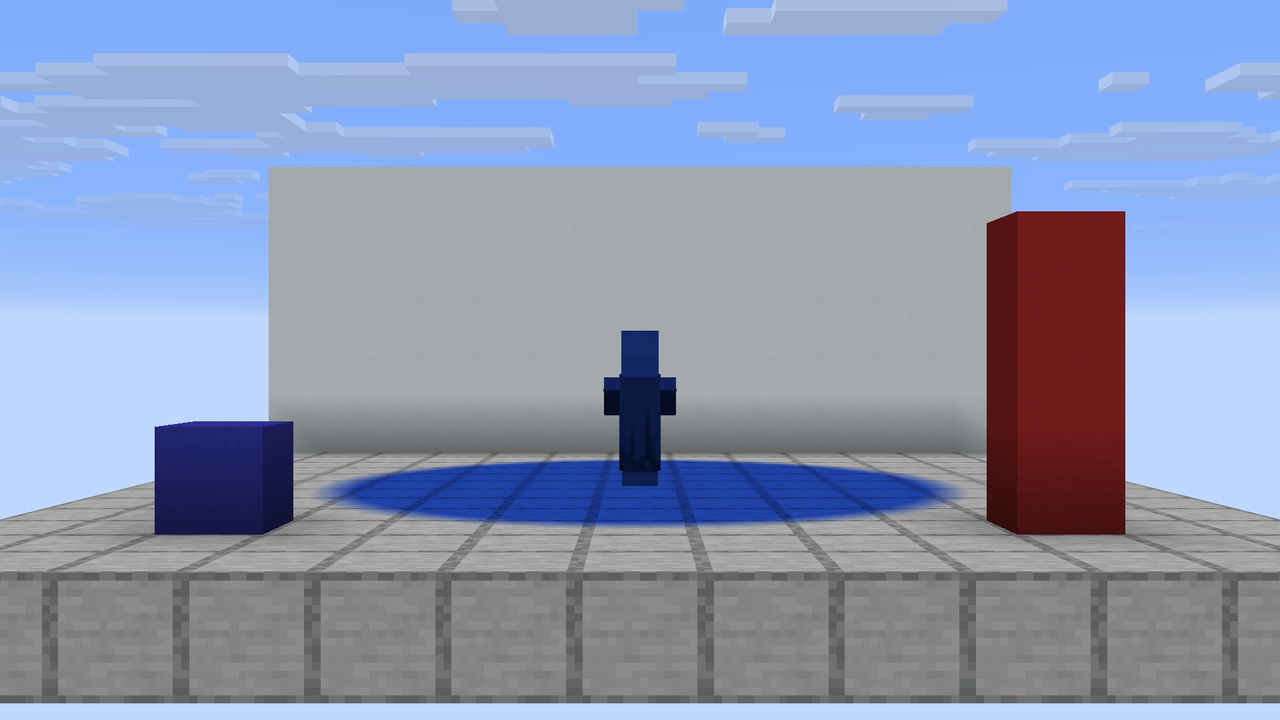
Its datapack definition:
{
    "type": "color_grade",
    "duration": 200,
    "easing": "ease_in_out_cubic",
    "persistent": true,
    "loop": true,
    "fade_ticks": 16,
    "params": {
        "screen_layer": 1,
        "saturation": {
            "keyframes": [
                {
                    "time": 0,
                    "value": 1.0
                },
                {
                    "time": 100,
                    "value": 0.0
                },
                {
                    "time": 200,
                    "value": 1.0
                }
            ]
        },
        "contrast": 1.0,
        "brightness": 1.0,
        "tint_r": 0.2,
        "tint_g": 0.4,
        "tint_b": 1.0
    },
    "mask": {
        "invert": false,
        "a": {
            "shape": "sphere",
            "space": "world",
            "volume": "surface",
            "center": {
                "bind": "entity",
                "selector": "@e[type=minecraft:villager,limit=1]",
                "point": "center"
            },
            "radius": 4.0,
            "softness": 0.5
        }
    }
}
show_mask_pulse_demo
Its datapack definition:
{
    "type": "color_grade",
    "duration": 200,
    "easing": "ease_in_out_cubic",
    "persistent": true,
    "loop": true,
    "fade_ticks": 16,
    "params": {
        "screen_layer": 0,
        "saturation": {
            "keyframes": [
                {
                    "time": 0,
                    "value": 1.0
                },
                {
                    "time": 100,
                    "value": 0.0
                },
                {
                    "time": 200,
                    "value": 1.0
                }
            ]
        },
        "contrast": 1.0,
        "brightness": 1.0,
        "tint_r": 1.0,
        "tint_g": 0.2,
        "tint_b": 0.2
    },
    "mask": {
        "invert": false,
        "a": {
            "shape": "sphere",
            "space": "world",
            "volume": "aura",
            "center": {
                "bind": "entity",
                "selector": "@e[tag=vfx_showcase,limit=1]",
                "point": "center"
            },
            "radius": {
                "bind": "entity",
                "selector": "@e[tag=vfx_showcase,limit=1]",
                "derive": "distance"
            },
            "softness": 0.5
        }
    }
}
show_sky_mask
A plain color_grade whose mask is the built-in sky leaf, so only the sky is tinted. As the
Sky masks section above says, {"shape": "sky"} is the whole form: no parameters, no center.
{
    "type": "color_grade",
    "duration": 200, "easing": "ease_in_out_cubic", "persistent": true, "loop": true, "fade_ticks": 16,
    "params": {
        "screen_layer": 0,
        "saturation": { "keyframes": [ { "time": 0, "value": 1.0 }, { "time": 100, "value": 1.4 }, { "time": 200, "value": 1.0 } ] },
        "contrast": 1.0, "brightness": 1.0,
        "tint_r": 0.05, "tint_g": 0.95, "tint_b": 0.35
    },
    "mask": { "invert": false, "a": { "shape": "sky" } }
}
show_dome_mask
The same grade restricted to a dome space figure — a circle addressed on the equirectangular sky
dome: center is [yaw, pitch] in degrees, radius is in dome units (0.5 spans half the dome),
and the shape is sky-occluded, so terrain standing in that direction is never tinted. The radius
breathes through mask.p0.p0.
{
    "type": "color_grade",
    "duration": 220, "easing": "ease_in_out_cubic", "persistent": true, "loop": true, "fade_ticks": 16,
    "params": {
        "screen_layer": 0, "saturation": 1.0, "contrast": 1.0,
        "brightness": { "keyframes": [ { "time": 0, "value": 1.0 }, { "time": 110, "value": 1.55 }, { "time": 220, "value": 1.0 } ] },
        "tint_r": 1.0, "tint_g": 0.2, "tint_b": 0.2,
        "mask.p0.p0": { "keyframes": [ { "time": 0, "value": 0.10 }, { "time": 110, "value": 0.22 }, { "time": 220, "value": 0.10 } ] }
    },
    "mask": {
        "invert": false,
        "a": { "shape": "circle", "space": "dome", "center": [0.0, -25.0], "radius": 0.10, "softness": 0.03 }
    }
}